OAuth
OAuth lets users sign in with Google, GitHub, or a custom provider. CRUDAuth runs the authorization-code flow, links the result to a user in your database, and establishes a session on the callback.
from crudauth import CRUDAuth, SessionTransport, OAuthCredentials

auth = CRUDAuth(
    session=get_session, user_model=User, SECRET_KEY="change-me",
    redirect_base_url="https://app.example.com",
    transports=[SessionTransport()],
    oauth={
        "google": OAuthCredentials(client_id="...", client_secret="..."),
        "github": OAuthCredentials(client_id="...", client_secret="..."),
    },
)
OAuth establishes a session on the callback, so it requires a SessionTransport and a
redirect_base_url. Each provider also needs a {provider}_id column on your user model
(google_id, github_id, ...) to store and match the account; AuthUserMixin includes the
built-in ones.
This adds two routes per provider: GET /oauth/{provider}/authorize (start the flow) and
GET /oauth/{provider}/callback (finish it). The redirect URI you register with the provider
is {redirect_base_url}/oauth/{provider}/callback. Both the paths and the response format are
configurable; see Custom paths and JSON responses.
CRUDAuth always uses PKCE. For a public client (one your identity provider registers without a
secret), leave out client_secret: OAuthCredentials(client_id="..."). The token request then
carries no client authentication, which providers configured for public clients expect. Google and
GitHub always need a secret for a server-side callback, so they raise at startup without one.
The flow
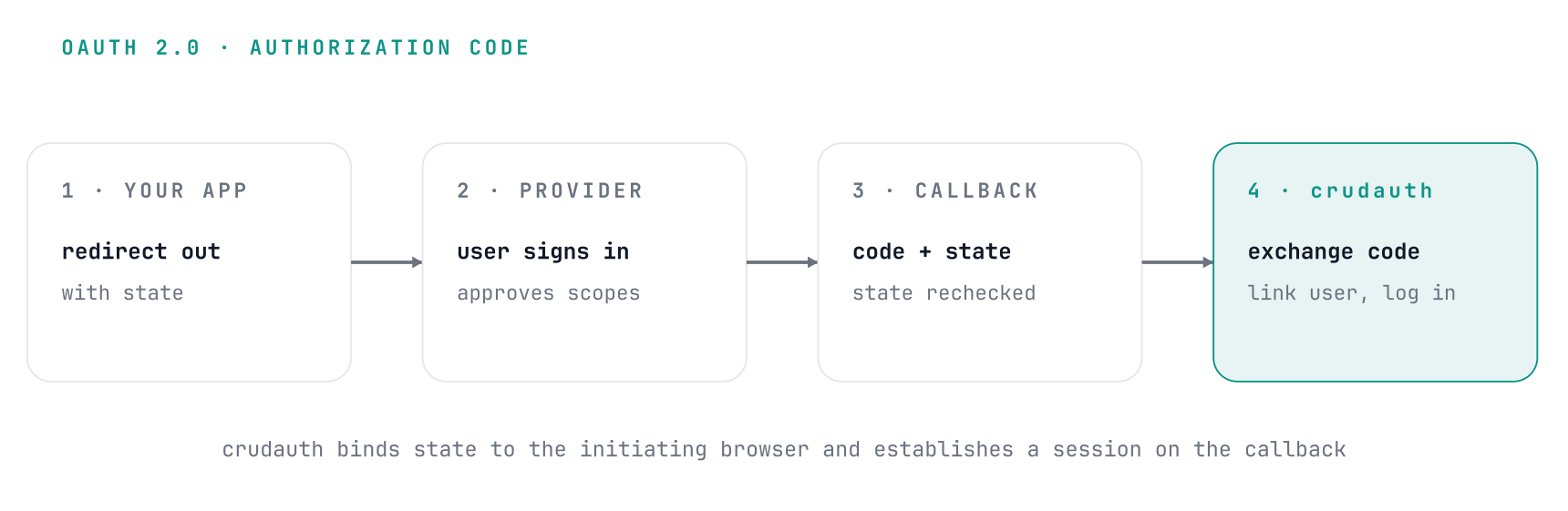
CRUDAuth binds the state parameter to the initiating browser via a cookie, so a stolen or
forged callback can't complete someone else's login. The redirect target after login must be
a same-origin relative path; anything else falls back to the default, which prevents open
redirects.
For hand-written post-login or post-logout redirects, reuse
safe_redirect_path rather than accepting a client-supplied URL
directly. It accepts only single-slash relative paths and falls back to / by default.
Account linking
On a successful callback, CRUDAuth finds or creates the user. A returning provider account signs
in to the user it's linked to. Otherwise the provider must report a verified email, or the sign-in
fails with email_unverified:
- If a user already exists with that email, the provider account is linked to it (the
{provider}_idcolumn is set), and the user can sign in by password or by that provider. If that user never verified its email, whoever registered it hasn't proven they own the address, so the link also claims the account: the password becomes unusable, any two-factor enrollment is removed,token_versionis bumped, every session is signed out, and the email is marked verified. The owner can set a password again with a password reset. A user already linked to a different account of the same provider isn't relinked (provider_already_linked). - Otherwise a new user is created from the provider profile. Its username comes from the
provider's username, given name, display name, or email local-part, reduced to lowercase
letters, digits, and single underscores, and cut to your
usernamecolumn's length (32 when the column has no length). A taken username gets_1,_2, ... and then a random suffix, still within that length. A provider email longer than youremailcolumn fails the sign-in (email_too_long) instead of reaching the insert. To set your own columns on that user (a requiredname, a default tier), usenew_user_fields/new_user_defaults, which run on this path too; see Registration.
A disabled user (is_active false) gets no session: the callback fails with account_inactive,
and nothing is written to the account first, so it is neither linked to the provider nor claimed.
CRUDAuth reads is_active as an attribute, so an app that soft-deletes users can keep its own flag
as the source of truth and expose it as a property:
class User(Base, AuthUserMixin):
    is_deleted: Mapped[bool] = mapped_column(default=False)

    @property
    def is_active(self) -> bool:
        return not self.is_deleted
OAuth logins skip two-factor authentication unless MfaConfig(oauth=True).
This linking logic lives in auth.oauth (an OAuthAccountService, or None when OAuth isn't
configured), so a hand-written callback can reuse it:
user, created = await auth.oauth.get_or_create_user(info, db). It raises
OAuthAccountException with the error code in code. See
Use the building blocks.
Provider data on every sign-in
CRUDAuth stores the provider id and the email. Anything else from the provider, especially data
that changes over time, is yours to keep, and on_oauth_login hands it to you on every sign-in
with the request's db. A GitHub login, for instance, changes when the user renames, and the
username CRUDAuth derives at creation is sanitized and never updated, so it can't stand in for it:
from sqlalchemy import update

async def keep_github_login(user, info, *, db, created, context):
    if info.provider == "github" and info.username:
        await db.execute(
            update(User).where(User.id == user["id"]).values(github_login=info.username)
        )
        await db.commit()

auth = CRUDAuth(..., hooks=AuthHooks(on_oauth_login=keep_github_login))
It runs on every OAuth sign-in that reaches an active account: one that created it (created is
True), linked it by email, or found it by provider id. It doesn't run for a disabled account or a
sign-in that failed before that (a bad state, a failed token exchange). It runs before any
MFA challenge, once per sign-in, and before the session exists.
Like every hook it's best-effort: it can't refuse the sign-in. An exception is logged, whatever the hook left uncommitted is rolled back, and the sign-in goes on. The hook commits its own writes. To refuse a sign-in based on the provider profile, use a hand-written callback.
A hand-written callback that calls auth.oauth.get_or_create_user runs the hook itself, after its
own checks, and is expected to refresh the user before reading it again:
user, created = await auth.oauth.get_or_create_user(info, db)
if not auth.repo.is_active(user):
    ...  # refuse
await auth.hooks.run_oauth_login(
    auth.repo.to_dict(user), info, db=db, created=created,
    context=HookContext(transport="oauth", request=request),
)
await auth.repo.refresh_if_expired(db, user)
Errors
A failed callback redirects to oauth_default_redirect (by default redirect_base_url) with
?error=<code>, or returns 400 with {"detail": "<code>"} in JSON mode:
| Code | Meaning |
|---|---|
oauth_failed |
The provider reported an error or the user declined, the callback was malformed, or the token exchange or profile request failed. |
invalid_state |
The callback's state doesn't match the browser's state cookie, or is no longer stored: the sign-in took longer than the state lives, finished in another browser, or was replayed. |
email_missing |
The provider account has no email address. |
email_unverified |
The provider reports the email as unverified. |
email_too_long |
The email is longer than your email column. |
provider_already_linked |
The matching user is linked to a different account of this provider. |
account_inactive |
The user is disabled. Nothing was written to the account. |
No session is created on any of these. In JSON mode an invalid_state answers 400 with
{"detail": "Invalid or expired OAuth state"} rather than the code. A state is used up by its first
callback, so a retry starts again from authorize.
GET /oauth/{provider}/authorize stores a state entry per request, so it's rate limited per IP
(oauth_authorize, 30 per hour by default; tune it with rate_limits=).
Any OpenID Connect provider
Keycloak, Zitadel, Authentik, Auth0, Okta, Entra ID and anything else that speaks OpenID Connect
needs no provider class. Give the credentials the provider's issuer and CRUDAuth reads its
endpoints from {issuer}/.well-known/openid-configuration:
auth = CRUDAuth(
    session=get_session, user_model=User, SECRET_KEY="change-me",
    redirect_base_url="https://app.example.com",
    transports=[SessionTransport()],
    oauth={
        "keycloak": OAuthCredentials(
            client_id="...",
            client_secret="...",
            issuer="https://sso.example.com/realms/main",
        ),
    },
)
The key you choose is the provider name, so this one links accounts on a keycloak_id column and
serves /oauth/keycloak/authorize. Scopes default to openid profile email; override them with
scopes=. Leave client_secret out for a public PKCE client, as with any other provider.
Discovery is a network call, so it runs when you start the app:
That's the same lifespan call Redis-backed storage needs. Without it the provider has no endpoints and says so on the first request rather than sending users somewhere empty.
What the discovery step checks, because a wrong answer here would send your users' credentials to the wrong place:
- The document must declare the same issuer you configured. A provider answering for someone else is rejected at startup.
- The issuer must be
https, except onlocalhostand127.0.0.1for local development, and can't carry a query or fragment. - The document must name an authorization, token and userinfo endpoint.
email_verifiedis honored exactly as the provider states it. A provider that doesn't claim a verified email can't auto-link to an existing account (see Account linking).
Client authentication follows what the document advertises: the secret rides in the request body
(client_secret_post) unless the provider accepts only HTTP Basic (client_secret_basic).
If you already know the endpoints, or you're driving OAuth yourself, build the provider directly:
from crudauth.oauth import GenericOIDCProvider

provider = await GenericOIDCProvider.from_discovery(
    "https://sso.example.com/realms/main",
    client_id, client_secret, "https://app.example.com/oauth/keycloak/callback",
    provider_name="keycloak",
)
Custom providers
A provider that isn't OpenID Connect (GitHub's OAuth, for instance) needs a class: implement the
AbstractOAuthProvider port, register it with OAuthProviderFactory, then pass its credentials in
oauth={...} like the built-ins. Set requires_client_secret = True on the class if the provider
never accepts a public client, so a missing secret fails at startup instead of at the first login.
See the OAuth reference for the port and factory.
Two hooks are there for a provider that needs setup before it can serve a login: initialize(),
which CRUDAuth.initialize() awaits for every configured provider (that's where the OIDC provider
fetches its discovery document), and _ensure_ready(), which runs before each outbound step so an
unconfigured provider raises a useful error instead of building a broken URL. Both are no-ops by
default. A provider can also take a transport= - an httpx transport used for its outbound calls,
for a proxy, a client certificate, or a test double.
auth.oauth_providers is the configured providers by name, read-only, which is where an OIDC
provider's resolved discovery document ends up.
Custom paths and JSON responses
oauth_paths moves the routes. Both paths must contain {provider}:
auth = CRUDAuth(
    session=get_session, user_model=User, SECRET_KEY="change-me",
    redirect_base_url="https://app.example.com",
    transports=[SessionTransport()],
    oauth={"google": OAuthCredentials(client_id="...", client_secret="...")},
    oauth_paths={
        "prefix": "/api/v1/auth/oauth",
        "authorize_path": "/{provider}",
        "callback_path": "/callback/{provider}",
    },
)
The redirect URI follows the same paths, here
https://app.example.com/api/v1/auth/oauth/callback/google. CRUDAuth doesn't see a prefix
you add when mounting (app.include_router(auth.router, prefix="/api")), so include that
prefix in redirect_base_url as well.
When the app isn't at the root
redirect_base_url builds the redirect URI registered with the provider, so it can't carry the
path an app is served under. A redirect-mode callback sends the browser there when redirect_to
is missing or unsafe, when the sign-in fails, and when it needs an MFA challenge. If the app
lives elsewhere, say a single-page app under /app with a landing page at /, point those at it
with oauth_default_redirect:
auth = CRUDAuth(
    ...,
    redirect_base_url="https://example.com",
    oauth_default_redirect="/app/login",
)
A failure then lands on /app/login?error=<code>, and an MFA challenge on
/app/login#mfa_challenge=.... It takes a same-origin path or an absolute http(s) URL;
anything else is refused at startup. A safe redirect_to still wins over it.
auth.oauth_router returns only the OAuth routes, for apps that mount their own auth routes
instead of auth.router. Mount one or the other, not both.
oauth_response_mode="json" is for single-page and mobile clients:
authorizereturns{"url": ...}instead of redirecting, and still sets the state cookie. The client then sends the browser to that URL.callbackreturns{"user": ..., "csrf_token": ..., "redirect_to": ...}with the session cookies set.userhas the same fields as/me. A failed callback returns400with{"detail": "<code>"}instead of redirecting (see Errors).
The provider still sends the browser to the redirect URI, so in JSON mode that URI should be a
frontend page: point redirect_base_url at the frontend, serve the callback path there, and
have that page call the API's callback with the same code and state, using
fetch(url, {credentials: "include"}). Call authorize with credentials too, so the browser
keeps the state cookie. That cookie is SameSite=Lax, so the frontend and the API must be on
the same site (for example app.example.com and api.example.com); a cross-site request
doesn't send it and the callback returns 400.