Email flows
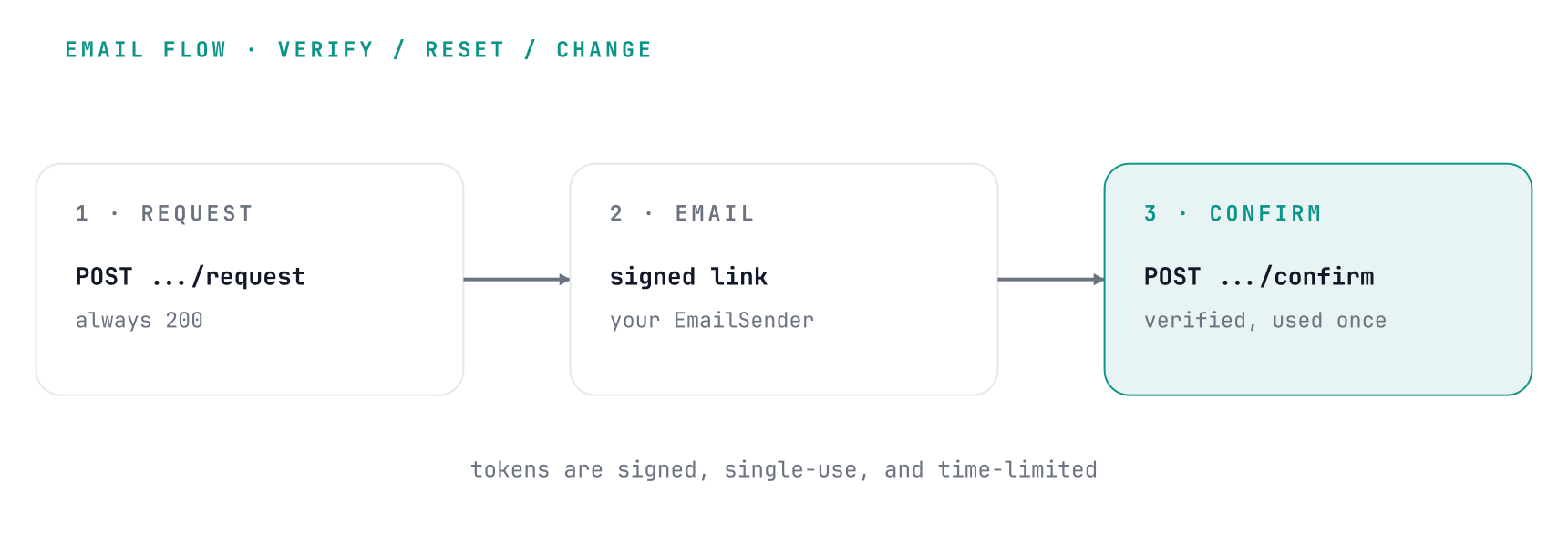
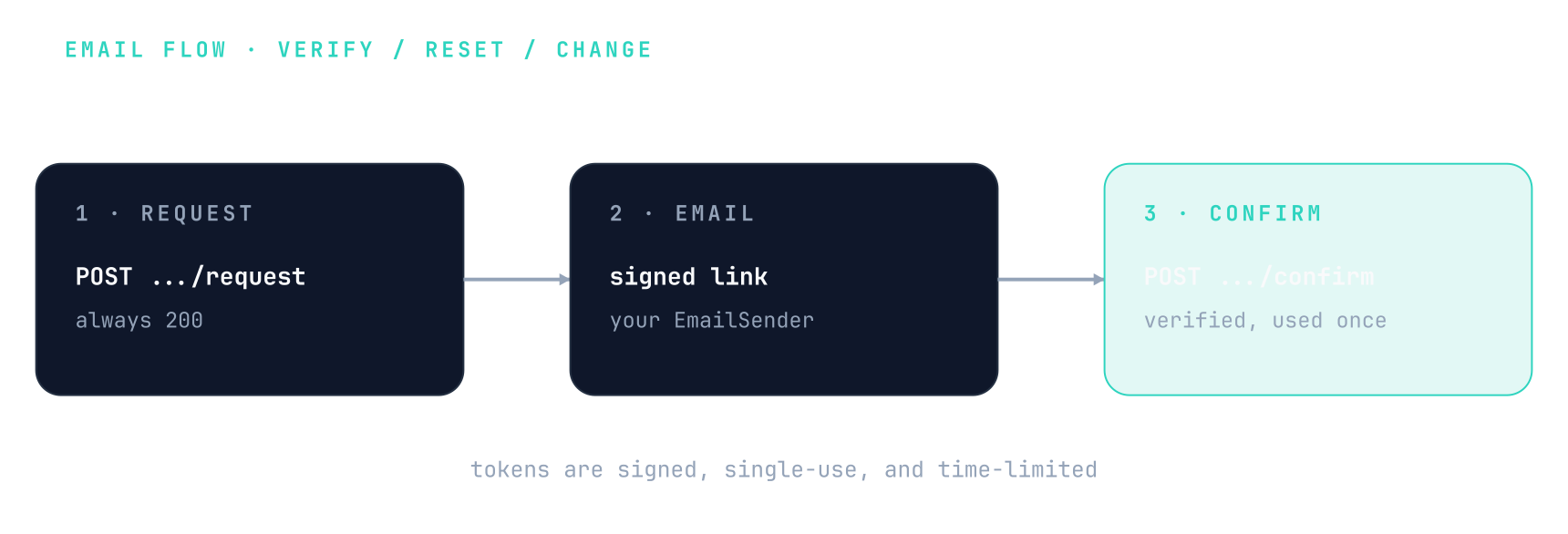
CRUDAuth runs three email flows: verify an address, reset a password, and change an address. Each is a two-step request/confirm cycle. CRUDAuth composes the message and signs a single-use token; you deliver the email; your frontend turns the click into a confirm call.
Configure a sender
On top of the base setup, email needs two things: an
EmailSender (how a message goes out) and an EmailConfig (where the links point). Together
they enable the six routes below.
from crudauth import CRUDAuth, EmailConfig, EmailSender

class MySender(EmailSender):
    async def send(self, *, to, subject, body, kind, context):
        # plain: deliver crudauth's text as-is. branded HTML: build your own
        # from context.link (the assembled URL), no need to parse it out of body.
        await tasks.enqueue(send_email, to=to, subject=subject, html=body)

auth = CRUDAuth(
    session=get_session, user_model=User, SECRET_KEY="change-me",
    email=EmailConfig(sender=MySender(), frontend_url="https://app.example.com"),
)
app.include_router(auth.router)   # adds the verify / reset / change routes
Prefer enqueueing onto a task queue over blocking on SMTP here: the request waits on send. A
raised send is logged and swallowed on every flow, so it never fails the request, but that
message is lost unless your queue retries it.
Sending your own HTML
body is crudauth's plain-text default. To send a branded template, read context
(EmailContext): context.link is the assembled, ready-to-click URL, so
you build a real button without regexing the link out of body, and context.kind /
context.expires_in round out the copy.
async def send(self, *, to, subject, body, kind, context):
    html = render(f"emails/{kind}.html", link=context.link, expires_in=context.expires_in)
    await tasks.enqueue(send_email, to=to, subject=subject, html=html)
context carries crudauth-owned data only (link, kind, recipient, expiry), never the bare token
and never user-controlled fields, so the sender can't be an injection vector. For per-user copy
(Hi Alice), write a delivery channel instead: it gets the db handle and
the user row, and owns its own escaping.
The link, and your frontend's job
CRUDAuth puts the token in the link as a query parameter:
{frontend_url}{path}?token=<signed-token>
# e.g. https://app.example.com/reset-password?token=eyJ...
That link points at your frontend, not at crudauth. Your page reads token from the URL
and POSTs it to the matching confirm endpoint. The paths default to /verify-email,
/reset-password, and /confirm-email-change, and are configurable on EmailConfig.
Sending someone back where they started
Someone who opens an invitation, signs up to accept it, and goes to their inbox to verify has
lost the invitation by the time they come back. Pass redirect_to on the request, and the
confirm response hands it back:
curl -X POST http://localhost:8000/email/verify-request \
  -H "Content-Type: application/json" \
  -d '{"email": "alice@example.com", "redirect_to": "/invites/abc123"}'

# after they click the link, your page POSTs the token and gets:
# {"detail": "Verified successfully.", "redirect_to": "/invites/abc123"}
The destination travels inside the signed token, not in the emailed URL, which has three consequences worth knowing:
- The link is byte-for-byte what it was before, so there is nothing in it for a recipient or a forwarder to edit.
- It survives the link being opened somewhere else. The invite arrives in a chat app on a phone and the email is confirmed on a laptop; the destination still comes back.
- Only same-origin relative paths are carried, checked by
safe_redirect_pathwhen the token is minted and again when it's redeemed. An absolute URL,//host,/\hostor a control character is dropped - the person still verifies their email, your page just falls back to its own default.
redirect_to works the same on /password/reset-request and /email/change-request, and the
matching confirm responses include it. The key is absent when no destination was asked for, and
it's the same key the OAuth callback and /mfa/verify already return, so one handler covers all
of them.
Walk-through: password reset
# 1. the user asks for a reset (always returns 200, even if the address is unknown)
curl -X POST http://localhost:8000/password/reset-request \
  -H "Content-Type: application/json" -d '{"email": "alice@example.com"}'

# 2. they click the emailed link; your /reset-password page reads ?token=... and submits:
curl -X POST http://localhost:8000/password/reset-confirm \
  -H "Content-Type: application/json" \
  -d '{"token": "eyJ...", "new_password": "a-new-strong-one"}'
Verify and change-email follow the same shape, with different bodies (below).
The routes
| Method & path | Body | What it does |
|---|---|---|
POST /email/verify-request |
{email, redirect_to?} |
Send a verification link. |
POST /email/verify-confirm |
{token} |
Consume the token, mark email_verified. |
POST /password/reset-request |
{email, redirect_to?} |
Send a reset link. |
POST /password/reset-confirm |
{token, new_password} |
Set the new password, revoke outstanding tokens. |
POST /email/change-request |
{new_email, password, redirect_to?} |
Authenticated; send a link to the new address. |
POST /email/change-confirm |
{token} |
Swap the email and mark it verified. |
Each confirm response carries redirect_to when the request that sent the link asked for one.
The -request endpoints return 200 whether or not the address exists, so they don't leak
which accounts are registered. A disabled account (is_active false) is treated as one that
doesn't exist: it's sent nothing, and a link it was sent before it was disabled stops working,
so a disabled account can't have its password reset, its address verified or its email changed. /email/change-request still rejects a wrong password (400)
or a new_email longer than your email column (422), since neither depends on other
accounts. Tokens are single-use and time-limited
(verify_ttl_hours, reset_ttl_hours, change_ttl_hours on EmailConfig).
Delivery channels
Email is the built-in delivery channel, but the token isn't email-specific. CRUDAuth owns the
token (mint, one-time-use, redemption); a DeliveryChannel owns the medium and the copy. Pass
channels= to route the same reset/verify token over SMS, WhatsApp, push, or several at once:
If you only want a branded HTML email (not a new medium), you don't need a channel: read
context.link in your EmailSender (Sending your own HTML above). Reach
for a channel when you need a different medium, or per-user copy that loads data off the db.
from crudauth import CRUDAuth, DeliveryChannel, DeliveryIntent, EmailConfig

class SMSChannel(DeliveryChannel):
    async def deliver(self, intent: DeliveryIntent, db) -> None:
        if intent.kind != "reset_password" or intent.token is None or db is None:
            return
        user = await db.get(User, intent.user["id"])   # load an app column synchronously
        if user and user.phone:
            link = f"https://app.example.com/reset-password?token={intent.token}"
            await sms.enqueue(to=user.phone, body=f"Reset your password: {link}")  # hand off

auth = CRUDAuth(
    session=get_session, user_model=User, SECRET_KEY="change-me",
    email=EmailConfig(sender=MySender(), frontend_url="https://app.example.com"),
    channels=[SMSChannel()],
)
Every configured channel fires for each flow, best-effort and independent: a channel that
raises is logged and skipped, and never stops another channel or changes the endpoint's
uniform 200 (so a dead integration can't leak which accounts exist or block the channel that
actually recovers the account). Reliability (retry, queueing) lives inside a channel.
email=EmailConfig(...) is just the built-in EmailChannel. With channels= and no
EmailConfig, the recovery endpoints still mount, and token lifetimes fall back to the
defaults (or pass verify_ttl_hours / reset_ttl_hours / change_ttl_hours to CRUDAuth).
deliver(intent, db) receives the message descriptor plus the request session. Two things to
know:
intent.recipientis where the message goes: the recovery value (an email address, or a phone number in a phone-recovery app) for verify, reset and the existing-account notice, the new address forchange_email, and the previous address for theemail_changednotice.change_emailreaches only channels that emailintent.recipient, marked with the class attributesends_email = True, because its token proves control of that address. The built-inEmailChannelsets it; set it on a custom channel that sends email. The change-email routes mount only when at least one such channel is configured.intent.userholds only CRUDAuth's logical fields, so an app column likephoneisn't in it. Read it offdbwithintent.user["id"](the session is present for verify, reset, change and theemail_changednotice,Nonefor the existing-account notice). Usedbsynchronously and never commit or capture it: it closes when the request ends, so read what you need, then enqueue the send (as above) rather than blocking on it.
Triggering recovery from your own code
When recovery is configured, the flow service is reachable as auth.emails (or None), so a
custom route can drive the same token mint/verify the endpoints use:
Hooks
on_after_recovery_verified, on_after_password_reset, and on_after_email_changed fire after
the matching confirm, so you can grant access, send a notice, or write an audit record.
Security notes
- A password reset bumps the user's
token_version, invalidating every bearer token issued before the reset, and evicts the user's other sessions. - The change-email link is sent to the new address, so confirming it proves control. Once
it's confirmed, the previous address gets an
email_changednotice. - Each token is bound to the account state it acts on and stops working when that state
changes: a reset link once the password or the recovery value changes, a change-email link
once the password, the email or
token_versionchanges, and a verification link once the address it was sent to is no longer the account's. Tokens issued by a CRUDAuth version without this binding are rejected, so links sent before an upgrade have to be requested again. -requestendpoints are throttled per address and per IP.