Permissions and Authorization
Authentication answers "who are you?". Authorization answers "what can you do?". This page covers the boilerplate's authorization patterns: role permissions, superuser flags, resource ownership, tier-based limits, and API key permissions.
Roles are the rbac feature, and the permission registry is core. A project without rbac keeps the
registry and every require_permissions check, which then pass for superusers only: see
Composable Features.
Authorization Patterns
The boilerplate ships five overlapping mechanisms. Pick the one(s) that fit your use case.
| Pattern | Where it lives | When to use |
|---|---|---|
| Role permissions | Role + RolePermission + UserRole models, require_permissions |
Granting a named capability to a group of users |
| Superuser flag | User.is_superuser boolean |
Admin-only operations |
| Resource ownership | Service-layer permission checks | "Users can only edit their own X" |
| Tier-based limits | Tier model + RateLimit rules |
Subscription gating, rate limits |
| API key scope | APIKey.permissions, a list of registry permission names |
What a key is allowed to do, once a key can authenticate a request |
These compose. A typical request goes through:
- Authentication — the session cookie, or an API key, identifies who
- Coarse access — role permissions, or the superuser flag, for privileged endpoints
- Fine-grained access — service-layer ownership / tier checks
- Rate limiting — tier-based per-route limits (separate concern)
Role-Based Permissions
A permission is a flat resource.action string — user.read, tier.update. Permissions are never granted to a user directly: a Role carries a set of them, and a user is assigned roles.
Three tables in modules/role/models.py:
| Table | Columns | Notes |
|---|---|---|
roles |
id, name (unique), description |
No soft delete — a deleted role is gone |
role_permissions |
role_id, permission_name (composite PK) |
ON DELETE CASCADE from roles |
user_roles |
user_id, role_id (composite PK) |
ON DELETE CASCADE from both sides |
Declaring a Module's Permissions
Each module owns its permission names in its own permissions.py, as a StrEnum decorated with @register_permissions("<resource>"):
# modules/user/permissions.py
from enum import StrEnum

from ...infrastructure.permissions import register_permissions


@register_permissions("user")
class UserPermission(StrEnum):
    READ = "user.read"
    CREATE = "user.create"
    UPDATE = "user.update"
    DELETE = "user.delete"
Registration is validated: the resource must match ^[a-z][a-z0-9_]*$, every member must be <resource>.<action> with an action matching the same pattern, and the whole name must fit the 100-character permission_name column. A resource can only be registered once.
discover_permissions() walks src.modules.*.permissions and imports each one; modules/__init__.py calls it at import time, so a new permissions.py needs no registration elsewhere.
The registry in infrastructure/permissions.py is what the rest of the app reads:
| Function | Returns |
|---|---|
all_permissions() |
Every registered name, as a frozenset[str] |
permission_groups() |
{resource: (names, ...)} — for a UI that offers permissions per resource |
is_known_permission(name) |
Whether a name is registered |
Unregistered names can't be stored: RolePermission validates permission_name against the registry and raises. In the other direction, a name that was stored and has since been removed from the code is ignored when permissions are loaded, so deleting a permission from a StrEnum can never grant anything.
Protecting a Route
require_permissions(*names) returns a dependency that answers 403 unless the caller holds every name. It injects nothing into the handler, so it goes in the route's dependencies:
# modules/user/routes.py
from ...infrastructure.auth.authorization import require_permissions


@router.get(
    "/",
    response_model=PaginatedListResponse[UserRead],
    dependencies=[require_permissions("user.read")],
)
async def get_users(
    db: AsyncSessionDep,
    user_service: UserServiceDep,
    page: int = 1,
    items_per_page: int = 10,
) -> dict[str, Any]:
    ...
Unknown names are a programming error, not a runtime one: require_permissions raises when the route is declared, so a typo fails at import rather than on the first request.
Superusers bypass every permission check. require_permissions passes them without a lookup, and get_current_permissions reports them as holding every registered permission — so a superuser needs no roles.
Reading the Caller's Permissions
When the handler itself has to decide, take the permission set instead of a guard. CurrentPermissionsDep (from infrastructure/auth/deps.py) is get_current_permissions as an Annotated alias; FastAPI resolves it once per request, so several guards and parameters share one query:
from ...infrastructure.auth.deps import CurrentPermissionsDep


@router.patch("/{username}")
async def update_user_profile(
    username: str,
    values: UserUpdate,
    current_user: CurrentUserDep,
    permissions: CurrentPermissionsDep,
    db: AsyncSessionDep,
    user_service: UserServiceDep,
) -> dict[str, str]:
    await user_service.verify_update_permission(current_user, username, permissions)
    ...
load_permissions(db, user_id, is_superuser=...) is the same lookup as a plain function, for code outside a request — or, as in the route above, for reading another user's permissions to compare against the caller's.
Granting Permissions
A role is a row in roles plus one role_permissions row per permission; assigning it is a row in user_roles. Write them through the ORM (from a script, a migration, or your own admin tooling):
from src.modules.role.models import Role, RolePermission, UserRole

role = Role(name="support", description="Read-only access to user records")
db.add(role)
await db.flush()

db.add(RolePermission(role_id=role.id, permission_name="user.read"))
db.add(UserRole(user_id=user_id, role_id=role.id))
await db.commit()
Managing Roles
The rbac feature mounts a role API under /api/v1/roles. Every route is gated by its own
role.* permission and by the delegation checks: a caller can neither grant a permission nor
assign a role carrying one unless they hold it themselves. Superusers pass both.
| Route | Permission | Also checked |
|---|---|---|
GET /api/v1/roles/ |
role.read |
— |
GET /api/v1/roles/{role_id} |
role.read |
— |
POST /api/v1/roles/ |
role.create |
the caller holds every permission the new role carries |
PATCH /api/v1/roles/{role_id} |
role.update |
the caller holds everything the role carries |
PUT /api/v1/roles/{role_id}/permissions |
role.update |
the caller holds every permission the change adds or removes, and no live account holding the role is a superuser or holds anything the caller doesn't |
DELETE /api/v1/roles/{role_id} |
role.delete |
the caller holds everything the role carries, and no live account holding the role is a superuser or holds anything the caller doesn't |
POST /api/v1/roles/{role_id}/users/{user_id} |
role.assign |
the caller holds everything the role carries, and the account is not a superuser and holds nothing the caller doesn't |
DELETE /api/v1/roles/{role_id}/users/{user_id} |
role.assign |
the same |
GET /api/v1/users/{user_id}/roles |
role.read |
— |
# Create a role carrying permissions you hold
curl -X POST http://localhost:8000/api/v1/roles/ -b cookies.txt \
  -H "Content-Type: application/json" -H "X-CSRF-Token: <token>" \
  -d '{"name": "editor", "description": "Edits profiles", "permissions": ["user.read", "user.update"]}'

# Hand it to somebody
curl -X POST http://localhost:8000/api/v1/roles/3/users/42 -b cookies.txt -H "X-CSRF-Token: <token>"
Only registered permission names are accepted: anything else answers 422, and the refusal doesn't
echo what was sent. A refused delegation answers 403 and writes nothing — including the reverse
cases: emptying or relabelling a role whose permissions the caller doesn't hold, and changing the
roles of an account stronger than the caller's own. That last rule is the one a user.update holder
is already held to when editing an account, because changing which roles an account holds is
another way to take it over, and emptying or deleting a role is held to it for every account that
holds the role, since either one takes the role's permissions away from all of them at once. An
account a soft delete has taken out is not one of those: its grants reach nobody, while its
assignment rows stay behind.
A stored name the registry no longer knows counts for nothing, and is not held against the caller either: a role carrying a name nothing declares any more can still be renamed, emptied and deleted by whoever holds the registered permissions it carries, and setting its permissions is what drops the stale name. Otherwise removing a feature would strand every role that carried one of its permissions, a superuser included.
Two writes to one role queue rather than race. Every write path takes the role's row first
(SELECT … FOR UPDATE): two requests assigning one role to one account both answer 201, two
replacing what it carries leave it carrying one of the two sets rather than both, and whichever
arrives after the role was deleted answers 404. An account a soft delete took out answers 404
as well, and one the admin panel deletes while an assignment is being written waits for it.
The account the write is about is held too, since the stronger-account checks read what it holds.
An assignment takes that row FOR NO KEY UPDATE, so a superuser handing the same account a role
the caller cannot reach lands either side of the write rather than between its check and its own
insert. Taking a role away, or replacing what it carries, is a change to every holder's grants, so
those rows are held FOR SHARE: two of those run at once, while an assignment to one of the
holders waits for them. The role's row is always taken before an account's, so the two orders
never meet.
What does wait is every write to an account's own row while a role write holds it: a profile edit, and the bookkeeping a sign-in writes there. Taking a role away holds the row of every account holding it until the delete commits. Both are the length of one role write, which reads a handful of rows and commits, and a row that only names the account — an API key, a usage row — waits for none of it.
A role_id or a user_id outside 1..2147483647 answers 422. No Integer column holds a value
past that, so the lookup used to reach the database and fail there.
A role name is unique, and the unique constraint has the last word: two requests racing for one name
give the loser a 409, not a 500.
Reading the Permissions
Two routes read them, both needing a session (the rbac feature mounts them):
# Every permission the running project has, grouped by the resource that declared it —
# what a UI offers when it builds a role, since a role may carry nothing else.
curl http://localhost:8000/api/v1/permissions -b cookies.txt
# → {"permissions": {"api_key": ["api_key.read", ...], "role": ["role.read", ...], ...}}

# What the caller holds, from every source the project wired.
curl http://localhost:8000/api/v1/permissions/me -b cookies.txt
# → {"permissions": ["user.update"]}
A superuser's own listing is every registered permission. A stored grant whose name is no longer registered appears in neither: the registry is what makes a name mean anything.
RBAC here is global roles: a role means the same thing everywhere in the project, and there is no per-tenant or per-object scoping. A permission answers "may this account do this kind of thing", not "may it do this to that row" — ownership checks stay in the services.
With the admin feature the panel carries the same three tables — see
Admin Panel. The panel signs in with the ADMIN_*
credentials rather than as an account, and those already let it set is_superuser on anybody, so
there is no weaker operator for the delegation checks above to hold back there. What the panel does
enforce is that a grant names a permission the registry knows.
Superuser Authorization
The User model has an is_superuser: bool column. Endpoints that should only be accessible to admins use the get_current_superuser dependency:
from typing import Annotated, Any

from fastapi import APIRouter, Depends

from ...infrastructure.auth.dependencies import get_current_superuser

router = APIRouter()


@router.delete("/admin/users/{username}")
async def gdpr_anonymize(
    username: str,
    _: Annotated[dict[str, Any], Depends(get_current_superuser)],
) -> dict[str, str]:
    # Only superusers reach this code
    ...
The leading _: is the codebase convention for dependency-only parameters whose value isn't used.
get_current_superuser returns 401 if not authenticated and 403 if authenticated but not a superuser. See Sessions for the dependency reference.
When to Use the Superuser Flag
- User management (create/delete other users)
- Tier assignment (
PATCH /api/v1/users/{username}/tier) - Rate limit configuration (
PATCH /api/v1/rate-limits/{name}) - GDPR data anonymization
- System configuration changes
Anything a subset of staff should be able to do is better expressed as a permission on a role than as another superuser.
Bootstrapping the First Superuser
The first superuser is created by scripts/setup_initial_data.py from ADMIN_* env vars on first run:
To grant superuser to an existing user, flip the column directly via the admin UI (/admin) or a one-off SQL update.
Resource Ownership
Most "users can only modify their own data" rules belong in the service layer, not the route. The service raises a PermissionDeniedError, which the global handler maps to HTTP 403.
Real example from modules/user/service.py:
from ..common.exceptions import PermissionDeniedError


async def verify_user_permission(
    self,
    current_user: dict[str, Any],
    target_username: str,
    action: str,
) -> None:
    """Raise PermissionDeniedError if current_user can't act on target_username."""
    if current_user["username"] != target_username and not current_user["is_superuser"]:
        raise PermissionDeniedError(f"Cannot {action} for another user")
Routes call this before dispatching the operation.
Where ownership and a role permission both apply, the service takes the permission set too. PATCH /api/v1/users/{username} is the example that ships:
# modules/user/routes.py
@router.patch("/{username}")
async def update_user_profile(
    username: str,
    values: UserUpdate,
    current_user: CurrentUserDep,
    principal: CurrentPrincipalDep,
    permissions: CurrentPermissionsDep,
    db: AsyncSessionDep,
    user_service: UserServiceDep,
) -> dict[str, str]:
    await user_service.verify_update_permission(
        current_user, username, permissions, is_superuser=principal.is_superuser, scoped=carries_a_scope(principal)
    )
    user = await user_service.get_by_username(username, db)

    if not user_service.is_self_or_superuser(current_user, user["username"], is_superuser=principal.is_superuser):
        target_permissions = await load_permissions(db, user["id"])
        user_service.verify_no_privilege_escalation(user, values, permissions, target_permissions)

    await user_service.update(user["id"], values, db)
    return {"message": "User updated successfully"}
The rules this enforces:
- A user may edit their own profile, and a credential that carries a scope needs
user.updateto edit that profile too. - A superuser may edit anyone.
- A
user.updateholder may edit another user only when that user is not a superuser and holds no permission the requester lacks — editing an account is a way to take it over, so it can't reach a stronger one. - Only a superuser may change another user's email address: a verified provider email is how an OAuth login is matched to an existing account.
The public UserUpdate schema accepts name, username, email and profile_image_url only. google_id, github_id, oauth_provider, email_verified and oauth_updated_at moved to UserAdminUpdate, which the admin panel uses — sending them to the API returns 422.
The exception flows up to the global handler (registered in infrastructure/app_factory.py) which translates it via the EXCEPTION_MAPPING table — PermissionDeniedError → ForbiddenException (403). See Exceptions for the full mapping pipeline.
Generic Ownership Pattern
For your own modules:
# modules/widgets/service.py
from ..common.exceptions import PermissionDeniedError, ResourceNotFoundError


class WidgetService:
    async def delete(
        self, widget_id: int, current_user: dict[str, Any], db: AsyncSession,
    ) -> None:
        widget = await crud_widgets.get(db=db, id=widget_id)
        if widget is None:
            raise ResourceNotFoundError("Widget not found")

        if widget["owner_id"] != current_user["id"] and not current_user["is_superuser"]:
            raise PermissionDeniedError("Cannot delete another user's widget")

        await crud_widgets.delete(db=db, id=widget_id)
Three rules to follow:
- Service raises domain exceptions, not HTTP exceptions. Lets the same logic be reused outside routes (admin scripts, tests, taskiq jobs).
- Superuser bypass is explicit.
not current_user["is_superuser"]makes the rule readable. - Order: existence check first, then ownership. A 404 is preferred to a 403 for resources the user shouldn't even know about — see the Hide Resource Existence note.
Tier-Based Authorization
Every user has a tier_id foreign key to the Tier model. The boilerplate ships bare tiers — just name and description, no built-in feature mapping or pricing logic. You decide what tiers mean.
Reading the User's Tier
User.tier is loaded automatically via lazy="selectin", so a fetched user record includes their tier:
@router.get("/me", response_model=UserRead)
async def me(
    current_user: Annotated[dict[str, Any], Depends(get_current_user)],
) -> dict[str, Any]:
    # current_user["tier"] is the joined Tier dict (or None)
    return current_user
Gating a Feature on Tier Name
For a simple feature gate, check the tier name directly in the service:
async def export_data(self, current_user: dict[str, Any], db: AsyncSession) -> bytes:
    tier = current_user.get("tier") or {}
    if tier.get("name") not in {"pro", "enterprise"}:
        raise PermissionDeniedError("Data export requires the Pro or Enterprise tier")
    # ...generate export...
This works for "binary" features. For more complex models (per-feature quotas, multiple add-ons), consider building an entitlements system on top — that's outside the scope of the boilerplate.
Tier-Based Rate Limits
Rate limiting is built-in: each RateLimit row binds a tier to a path with a limit and period. crudauth's limiter, wired in infrastructure/auth/setup.py, enforces these per request. See Rate Limiting.
To configure rate limits for a tier:
# Create a rate limit (admin only)
curl -X POST http://localhost:8000/api/v1/rate-limits/ \
  -b superuser_cookies.txt \
  -H "Content-Type: application/json" \
  -H "X-CSRF-Token: <token>" \
  -d '{
    "tier_id": 2,
    "name": "pro_users",
    "path": "/api/v1/widgets/",
    "limit": 1000,
    "period": 60
  }'
API Key Scope
A key's scope is a list of registry permission names — the same vocabulary a role carries and
require_permissions gates on — stored on the key row:
# modules/api_keys/models.py
class APIKey(Base, TimestampMixin):
    __tablename__ = "api_keys"

    permissions: Mapped[list[str]] = mapped_column(JSON, insert_default=list)
Create and update validate every name against the registry, so a scope can only name a permission
the project declares. An unregistered name answers 422 without echoing what was sent, and the
names come back deduplicated and sorted. A key created without permissions is unscoped: it
names its owner and carries no permission at all.
curl -X POST http://localhost:8000/api/v1/api-keys/ \
  -b cookies.txt \
  -H "Content-Type: application/json" \
  -H "X-CSRF-Token: <token>" \
  -d '{"name": "Read-only integration", "permissions": ["user.read"], "usage_limits": {"requests_per_day": 10000}}'
A stored name the registry no longer knows is read back as it is and counts for nothing, the same
way a role's stale grant does. A scope stored in a shape that is not a list of names, the object an
older version wrote, is not read back at all: the key answers 401 with a warning naming it, until
scripts/cleanup_api_key_json.py rewrites the row.
What a key holds
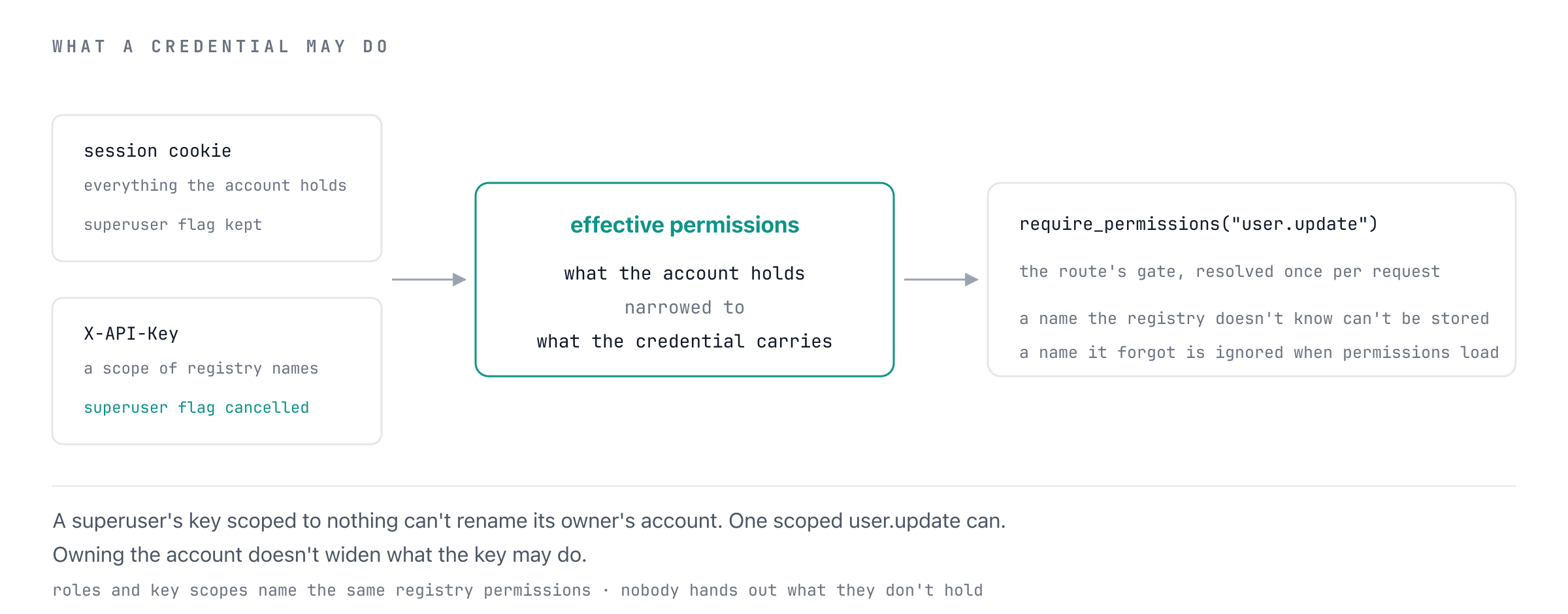
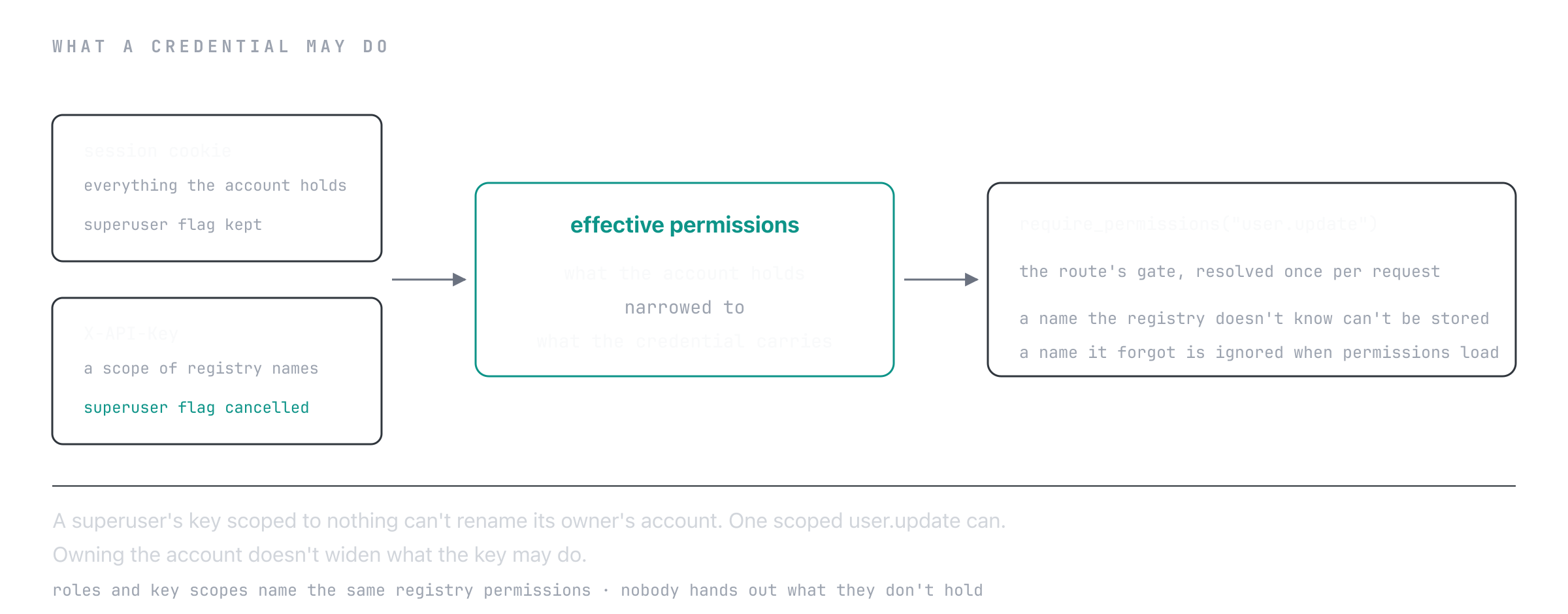
A key-authenticated request holds its owner's permissions, narrowed to the key's scope. The scope
never grants: a permission the owner loses disappears from the key at the next request, and a key
scoped to nothing holds nothing — it names its owner and that is all. GET /api/v1/permissions/me
answers with the narrowed set, so a client can read exactly what its key can do.
A key's scope may name only permissions its creator holds at the time: POST /api/v1/api-keys/ and
a PATCH that widens one answer 403 otherwise, so a key can never be minted stronger than the
credential minting it.
A key is never a superuser
is_superuser grants what no scope can name — it bypasses the ownership checks in the services,
not just permission gates — so a credential carrying a scope is held to that scope whatever the
account is marked. A superuser's key scoped to ["user.read"] holds user.read, passes a route
gated on it, and is refused by require_permissions("role.read") and by every superuser-only
route. The superuser's own session is unaffected.
This holds everywhere the flag was read: the delegation checks behind the role routes compare
against what the credential holds, so a superuser's key scoped to role.assign cannot assign
a role carrying anything its scope lacks; and editing another account, or reading its tier or
rate limits, goes by the acting credential's flag rather than the account's row.
Ownership is a separate axis: a scope narrows permissions, not what an account owns. It is no
licence on its own, though. Editing a profile takes user.update of a scoped credential even
where the profile is its owner's, so a key minted for reading cannot rename the account behind
it. The other self-service routes, the password, the address, closing the account and managing
keys, take a session and refuse a key outright
(API keys).
A key's lifecycle is is_active and expires_at: revoking is one way, and an expiry can be
brought forward but never pushed back. API Keys has
the routes.
Combining Patterns
A real endpoint often uses several at once:
@router.delete("/widgets/{widget_id}", status_code=204)
async def delete_widget(
    widget_id: int,
    current_user: Annotated[dict[str, Any], Depends(get_current_user)],   # 1. authn
    db: Annotated[AsyncSession, Depends(async_session)],
    widget_service: Annotated[WidgetService, Depends(get_widget_service)],
) -> None:
    # The service handles:
    #   2. Existence check
    #   3. Ownership check (superuser bypass)
    #   4. Tier feature gate (e.g. "delete requires Pro tier")
    await widget_service.delete(widget_id, current_user, db)
The route stays trivial. Authorization rules accumulate in the service, where they're testable and reusable.
Testing Authorization
Test the service, not the route, for permission rules — they're easier to set up and faster to run.
import pytest
from src.modules.user.service import UserService
from src.modules.common.exceptions import PermissionDeniedError


@pytest.mark.asyncio
async def test_normal_user_cannot_update_other_users():
    service = UserService()
    current_user = {"username": "alice", "is_superuser": False}

    with pytest.raises(PermissionDeniedError):
        await service.verify_user_permission(current_user, "bob", "update profile")


@pytest.mark.asyncio
async def test_superuser_can_update_other_users():
    service = UserService()
    current_user = {"username": "alice", "is_superuser": True}

    # Should not raise
    await service.verify_user_permission(current_user, "bob", "update profile")
For end-to-end coverage, integration tests against TestClient exercise the full session-cookie + permission-check stack. See Testing.
Best Practices
Keep authorization in services
Routes do dependency injection and HTTP shaping; services hold rules. If a PermissionDeniedError raise feels out of place in your service, that's a sign your service is doing more than business logic.
Order checks: authn → existence → ownership → quota
# 1. Authenticated? — done by the dependency
# 2. Resource exists?
if widget is None:
    raise ResourceNotFoundError(...)
# 3. User owns it?
if widget["owner_id"] != current_user["id"] and not current_user["is_superuser"]:
    raise PermissionDeniedError(...)
# 4. Quota / tier OK?
if not within_tier_limits(...):
    raise PermissionDeniedError(...)
This order prevents leaking existence (404 before 403) and keeps the cheap checks first.
Don't reinvent rate limits
The built-in tier rate-limiter middleware is enforced before your route runs. Don't roll your own per-feature counters unless you need something the middleware can't express. See Rate Limiting.
Audit superuser actions
Superuser endpoints touch sensitive data. Log the actor + action server-side — the boilerplate's logging infrastructure (with correlation_id + support_id) makes this straightforward. See Logging for the setup.
Next Steps
- Sessions — How session-based authentication works
- Rate Limiting — Tier-based rate limit middleware
- Exceptions — How
PermissionDeniedErrorbecomes 403 - Production — Hardening checklist