Index

Modern admin interface for FastAPI with built-in authentication, event tracking, and security features


CRUDAdmin is a robust admin interface generator for FastAPI applications, offering secure authentication, comprehensive event tracking, and essential monitoring features. Built with FastCRUD and HTMX, it helps you create production-ready admin panels with minimal configuration.
Experimental Status
CRUDAdmin is still experimental. While actively developed and tested, APIs may change between versions. Upgrade with caution in production environments, always carefully reading the changelog.
Features
- 🔒 Session Management: Sessions in memory, Redis or the admin database, built on crudauth, with a Sessions page to sign devices out
- 🛡️ Built-in Security: CSRF protection, login lockout, password confirmation before admin-account changes, IP allowlists, HTTPS enforcement, and secure session cookies (HttpOnly, Secure, SameSite=Strict)
- 👥 Roles: Superusers manage admin accounts and see the event log; other admins work with your models
- 📝 Event Tracking & Audit Logs: Comprehensive audit trails for all admin actions with user agent parsing and attribution
- 📊 Auto-generated Interface: Creates admin UI directly from your SQLAlchemy models with intelligent field detection
- 🔍 Advanced Filtering: Type-aware field filtering, search, and pagination with bulk operations
- 🌗 Modern UI: Clean, responsive interface built with HTMX and FastCRUD
Video Preview
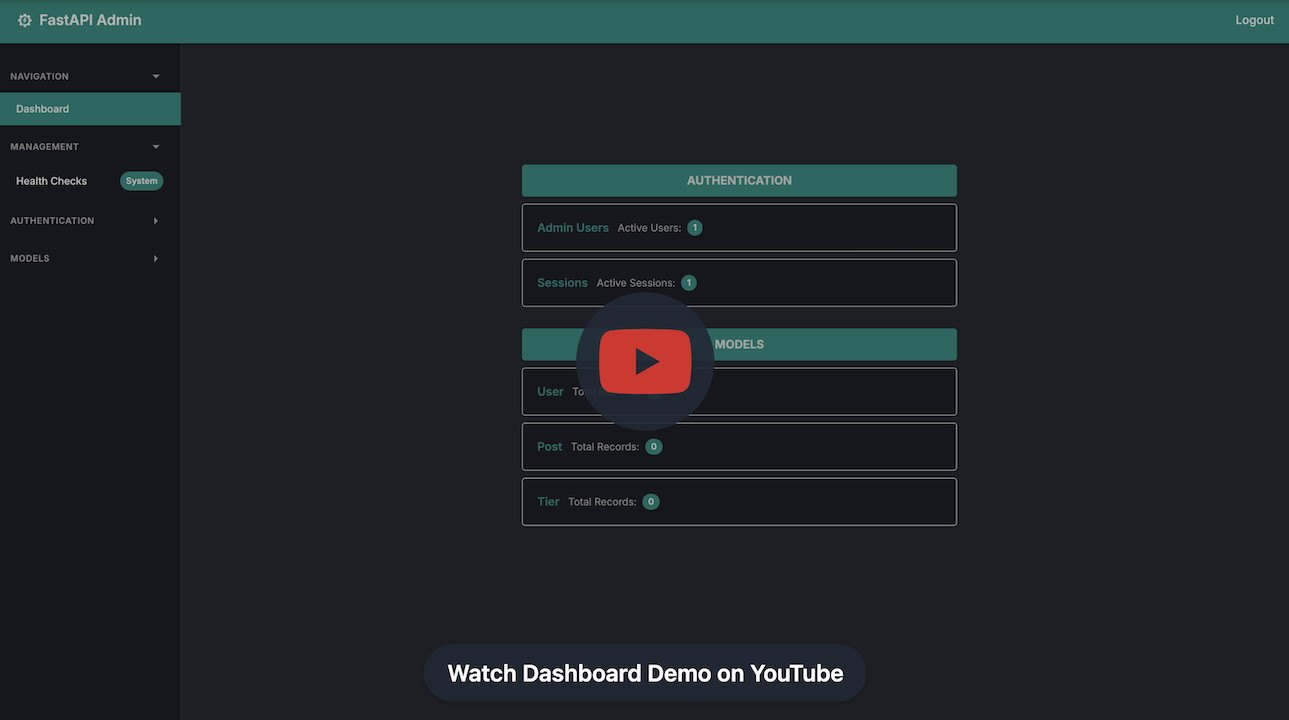
To see what CRUDAdmin dashboard looks like in practice, watch the video demo on youtube:
Minimal Example
Here's how simple it is to get a complete admin interface running:
Define your SQLAlchemy models (click to expand)
Define your Pydantic schemas (click to expand)
Now, create your admin interface:
from contextlib import asynccontextmanager
from fastapi import FastAPI
from sqlalchemy.ext.asyncio import AsyncSession, create_async_engine
from crudadmin import CRUDAdmin

engine = create_async_engine("sqlite+aiosqlite:///app.db")


async def get_session():
    async with AsyncSession(engine) as session:
        yield session


admin = CRUDAdmin(
    session=get_session,
    SECRET_KEY="your-secret-key-here",
    initial_admin={
        "username": "admin",
        "password": "secure_password123",
    },
)

admin.add_view(
    model=User,
    create_schema=UserCreate,
    update_schema=UserUpdate,
    allowed_actions={"view", "create", "update"},
)


@asynccontextmanager
async def lifespan(app: FastAPI):
    async with engine.begin() as conn:
        await conn.run_sync(Base.metadata.create_all)
    await admin.initialize()
    yield
    await admin.shutdown()


app = FastAPI(lifespan=lifespan)
app.mount("/admin", admin.app)
And it's all done! Navigate to /admin to access your admin interface with:
- User authentication
- CRUD operations for your models
- Responsive UI with dark/light themes
- Built-in security features
Requirements
Before installing CRUDAdmin, ensure you have the following prerequisites:
- Python: Version 3.10 or newer.
- FastAPI: CRUDAdmin is built to work with FastAPI, so having FastAPI in your project is essential.
- FastCRUD: CRUDAdmin is built on top of FastCRUD for CRUD operations (which requires SQLAlchemy 2.0+ for database operations and Pydantic 2.0+ for data validation and serialization).
- aiosqlite: Required for async SQLite operations (automatically installed as a dependency).
Installing
To install, just run:
Or, if using pip:
Optional Dependencies
For production use with different session backends:
redis adds the Redis session backend; postgres and mysql add drivers for keeping the admin database there:
uv add "crudadmin[redis]"
uv add "crudadmin[postgres]"
uv add "crudadmin[mysql]"
uv add "crudadmin[redis,postgres]"
Development Installation
For development with all extras:
Usage
CRUDAdmin offers flexible configuration options for different deployment scenarios:
Basic Development Setup
from crudadmin import CRUDAdmin

admin = CRUDAdmin(
    session=get_session,
    SECRET_KEY="your-secret-key",
    initial_admin={
        "username": "admin",
        "password": "admin123",
    },
)

admin.add_view(
    model=User,
    create_schema=UserCreate,
    update_schema=UserUpdate,
)

app.mount("/admin", admin.app)
Production Configuration with Security
from crudadmin import AccessConfig, CRUDAdmin, RedisConfig, SessionConfig

admin = CRUDAdmin(
    session=get_session,
    SECRET_KEY=os.environ["ADMIN_SECRET_KEY"],
    sessions=SessionConfig(
        backend="redis",
        redis=RedisConfig(url="redis://localhost:6379"),
        max_per_admin=3,
        timeout_minutes=15,
        secure_cookies=True,
    ),
    access=AccessConfig(
        allowed_ips=["10.0.0.1"],
        allowed_networks=["192.168.1.0/24"],
        trusted_proxy_hops=1,
        enforce_https=True,
    ),
    track_events=True,
    admin_db_url="postgresql+asyncpg://user:pass@localhost/admin",
)
trusted_proxy_hops=1 reads the client IP from X-Forwarded-For behind one reverse proxy; leave it at 0 when the app is exposed directly. track_events=True records logins, failed logins, lockouts and every change in the event log.
Advanced Model Configuration
from crudadmin.admin_interface.model_view import PasswordTransformer

password_transformer = PasswordTransformer(
    password_field="password",
    hashed_field="hashed_password",
    hash_function=hash_password,
    required_fields=["username", "email"]
)

admin.add_view(
    model=User,
    create_schema=UserCreateWithPassword,
    update_schema=UserUpdate,
    allowed_actions={"view", "create", "update"},
    password_transformer=password_transformer,
)

admin.add_view(
    model=AuditLog,
    create_schema=AuditLogSchema,
    update_schema=AuditLogSchema,
    allowed_actions={"view"},
)
Session Backend Configuration
Sessions, CSRF tokens and login-lockout counters live in one of three backends:
from crudadmin import CRUDAdmin, RedisConfig, SessionConfig

admin = CRUDAdmin(session=get_session, SECRET_KEY=SECRET_KEY)

admin = CRUDAdmin(
    session=get_session,
    SECRET_KEY=SECRET_KEY,
    sessions=SessionConfig(
        backend="redis",
        redis=RedisConfig(host="localhost", port=6379, password="redis-password"),
    ),
)

admin = CRUDAdmin(
    session=get_session,
    SECRET_KEY=SECRET_KEY,
    sessions=SessionConfig(backend="database"),
)
The default, memory, is per process: fine for development and a single worker. With several workers, use redis, or database to keep them in the admin database without extra infrastructure. See Session Backends.
What You Get
Once set up, CRUDAdmin provides:
- Admin Dashboard: Overview of your models and system health
- Model Management: Auto-generated forms for CRUD operations
- User Authentication: Login with lockout, CSRF-protected changes, and a Sessions page to sign devices out
- Event Logs: Track all admin actions with full audit trails
- Health Monitoring: Real-time system status and diagnostics
- Security Features: IP allowlists, HTTPS enforcement, secure session cookies
- Responsive UI: Works on desktop and mobile devices
Next Steps
- Quick Start: Get up and running in 5 minutes
- Basic Configuration: Detailed configuration options
- Advanced Topics: Production features and advanced configurations
- API Reference: Complete API documentation